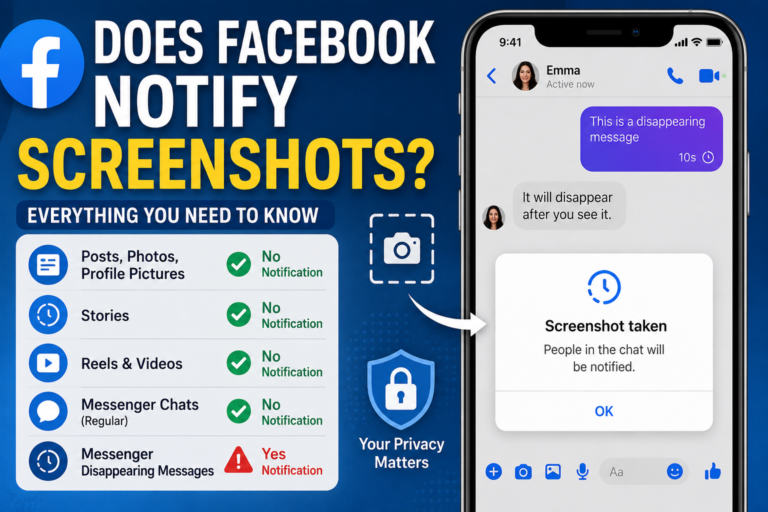
If you’ve ever wondered, does Facebook notify screenshots, the short answer is no in almost every situation. You can take screenshots of Facebook posts, photos, profiles, Stories, Reels, and regular Messenger conversations without the other person receiving a notification. However, there is one important exception involving disappearing messages in Messenger.
This guide explains exactly when Facebook sends screenshot notifications, when it doesn’t, and what you should know about privacy on the platform. Whether you’re saving a helpful post, capturing a conversation, or protecting your own content, understanding Facebook’s screenshot policies can help you use the platform with confidence. For more insights read here:-wordhippo 5 letter word and domain name sites.
Does Facebook Notify Screenshots? Quick Answer
For most Facebook content, the platform does not notify users when someone takes a screenshot. This applies to nearly everything you see on Facebook, including posts, photos, profile pictures, Stories, Reels, comments, and standard Messenger chats. Multiple technology publications and recent testing continue to confirm this behavior.
The only widely recognized exception is Messenger disappearing messages. When disappearing messages are enabled in an end-to-end encrypted Messenger conversation, taking a screenshot triggers a notification so both participants know that temporary content has been captured.
Which Facebook Screenshots Send Notifications?
Facebook Posts
Taking a screenshot of someone’s public or private post does not notify the original poster.
Whether you’re using the Facebook app or accessing Facebook through a web browser, screenshots of feed posts remain private. The person who created the post has no way of knowing that you’ve saved an image of it.
Photos and Profile Pictures
Facebook also does not send notifications when you screenshot:
- Profile pictures
- Cover photos
- Uploaded photo albums
- Individual photos
- Tagged images
The owner of the photos won’t receive an alert, regardless of whether the account is public or private. Keep in mind that privacy settings still determine whether you can view the image in the first place.
Facebook Stories
Unlike Snapchat, Facebook Stories do not generate screenshot notifications.
This often surprises new users because Stories disappear after 24 hours. While Facebook adopted the disappearing Story format, it did not adopt Snapchat’s screenshot notification feature. As a result, users can capture a Story without the creator being alerted.
Reels and Videos
Facebook Reels and videos can also be screenshotted or screen-recorded without notifying the content creator.
Content creators may notice views, reactions, comments, and shares, but they cannot see who captured their content using screenshots or screen recordings.
The One Exception: Messenger Disappearing Messages
How Disappearing Messages Work
Messenger includes disappearing messages for conversations protected with end-to-end encryption. These messages automatically vanish after they’ve been viewed or after a selected period.
Because these chats are designed to be temporary, Facebook adds an extra privacy safeguard. If someone attempts to preserve the conversation by taking a screenshot, Messenger notifies the participants.
What Happens After a Screenshot?
When disappearing messages are active, Messenger displays a screenshot notification within the conversation.
This helps maintain the purpose of temporary messaging by informing participants that someone has saved the content before it disappeared. Both people in the chat can see that a screenshot was taken.
Regular Messenger Chats Are Different
If you’re chatting normally without disappearing messages enabled, screenshots remain private.
You can capture text conversations, shared photos, voice messages, or other standard chat content without triggering any notification. Also explore:-vera davich and mallory plotnik.
Screenshot Notification Comparison
| Facebook Feature | Screenshot Notification? |
|---|---|
| Posts | No |
| Photos | No |
| Profile Pictures | No |
| Cover Photos | No |
| Stories | No |
| Reels | No |
| Comments | No |
| Marketplace Listings | No |
| Regular Messenger Chats | No |
| Messenger Disappearing Messages | Yes |
The table highlights that Facebook keeps screenshot activity private in nearly every situation except disappearing Messenger conversations.
Why People Think Facebook Sends Screenshot Notifications
Confusion With Snapchat
Much of the confusion comes from Snapchat, which famously alerts users when someone screenshots chats or Snaps.
Many people assume Facebook follows the same approach because both platforms include Stories and private messaging features. In reality, Facebook has never broadly implemented screenshot notifications across its social platform.
Share Pop-Ups After Taking a Screenshot
Some users notice a “Share Now” suggestion immediately after taking a screenshot.
This is generally a feature provided by your phone’s operating system or Facebook’s sharing integration rather than a notification sent to the other user. Community discussions consistently report that these prompts do not mean Facebook has informed the content owner.
Third-Party App Claims
From time to time, apps claim they can reveal who screenshotted your Facebook profile or posts.
There is no evidence that these apps can access such information through Facebook. Since Facebook itself doesn’t provide screenshot tracking for normal content, third-party apps cannot reliably offer that feature either.
Privacy Tips for Facebook Users
Even though Facebook usually doesn’t notify screenshots, it’s still wise to think carefully before sharing sensitive content online.
Consider these best practices:
- Avoid posting confidential or personal information publicly.
- Use Friends or custom privacy settings when appropriate.
- Remember that screenshots and screen recordings can preserve content permanently.
- Add watermarks to original images if you’re concerned about unauthorized sharing.
- Use disappearing messages only when temporary communication is important.
These habits can help protect your privacy regardless of Facebook’s screenshot policy.
Frequently Asked Questions
Q: Does Facebook notify screenshots of Stories?
A: No. Facebook does not notify users when someone screenshots a Story. You can capture a Story without the creator receiving an alert. This has remained the platform’s behavior despite frequent comparisons with Snapchat.
Q: Does Facebook Messenger notify screenshots?
A: Regular Messenger conversations do not generate screenshot notifications. However, if disappearing messages are enabled in an encrypted conversation, Messenger will notify participants when a screenshot is taken.
Q: Can someone see if I screenshot their Facebook profile picture?
A: No. Facebook does not notify users when someone screenshots their profile picture, cover photo, or other standard images on the platform.
Q: Does screen recording trigger Facebook notifications?
A: No. Screen recordings are treated the same as screenshots for standard Facebook content. The only notable exception is disappearing messages in Messenger, where privacy protections apply.
Q: Can third-party apps tell me who took screenshots of my Facebook posts?
A: No. There is no verified method for third-party apps to identify who screenshots your Facebook content. Claims suggesting otherwise should be viewed with caution.
Conclusion
If you’re asking, does Facebook notify screenshots, the answer is straightforward. Facebook does not notify users when you screenshot posts, photos, profile pictures, Stories, Reels, Marketplace listings, or regular Messenger chats. The only significant exception is Messenger disappearing messages, where screenshot notifications are intentionally built in to protect temporary conversations.
While screenshots are usually private, it’s always worth remembering that anything shared online can potentially be saved or redistributed. Whether you’re capturing useful information or posting your own content, understanding Facebook’s privacy features helps you make informed decisions and use the platform more confidently.